
Không chỉ là một chatbot thông thường, Kiro CLI hoạt động như một cộng sự AI thực thụ, có khả năng thấu hiểu toàn bộ dự án để tự động viết code, debug và quản lý hạ tầng mà bạn không cần rời tay khỏi bàn phím.
Kiro CLI Là Gì?
Kiro CLI là công cụ AI dạng terminal giúp hiểu dự án tốt hơn, chỉnh sửa lỗi dự án, hỗ trợ tạo code build infrastructure luôn. Bạn làm tất cả việc này không cần rời khỏi cửa sổ dòng lệnh. Chỉ cần mô tả bằng ngôn ngữ tự nhiên, Kiro sẽ giúp bạn làm tất cả.
Khả Năng Xây Dựng Dự Án Có Specialization
Có thể tạo custom agents phù hợp với codebase của bạn:
- Backend specialist biết API patterns
- Frontend expert quen với components
- DevOps agent hiểu infrastructure
Mỗi agent focus toàn bộ context window vào những gì quan trọng cho workflow đó.
Tại Sao Cần Kiro CLI
1. Dùng Trong Terminal(Cửa Sổ Dòng Lệnh)
Không cần context switching. Không cần look up syntax. Chỉ mô tả những gì bạn cần và tiếp tục build.
2. Cấu Trúc Lại AI Workflows
Custom agents cho phép nó hiểu context cho từng task khác nhau. Switch giữa chúng một cách thuận lợi.
3. Xây Dựng Luôn Cơ Sở Hạ Tầng
Quản lý infrastructure, review code, hoặc debug—tạo agents cho các workflows và share với team trong dự án một cách dễ dàng.
Cách Cài Đặt Kiro CLI
Truy cập vào Website
Kiro CLI hỗ trợ macOS và Linux:
curl -fsSL https://cli.kiro.dev/install | bash

Làm Các Bước Sau
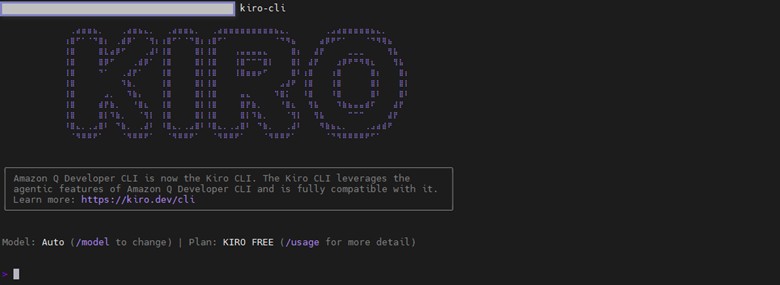
- Authenticate và bắt đầu chat:
kiro-cli
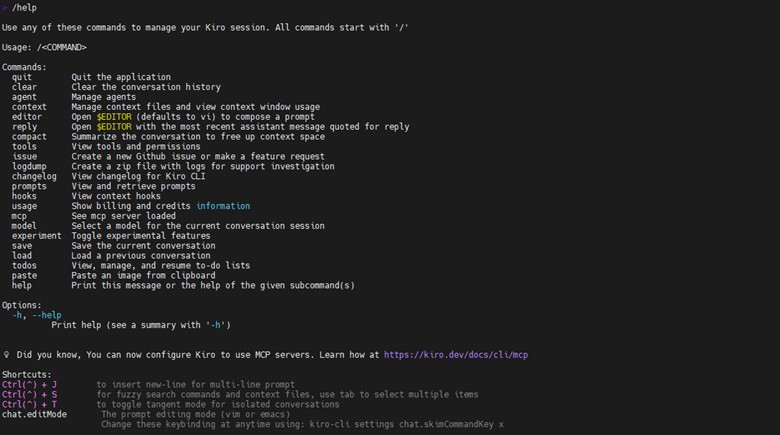
- Explore commands:
/help
Tính Năng Chính Của Kiro CLI
1. Custom Agents – Cấu Trúc Cho AI Coding
Custom agents mang lại cấu trúc cho AI-powered terminal workflows bằng cách cho phép bạn define chính xác AI nên behave như thế nào cho các tasks khác nhau.
Lợi ích:
- Pre-approved tools: Tin tưởng specific tools chạy mà không cần permission prompts liên tục
- Persistent context: Tự động load project files, documentation và standards
- Controlled access: Giới hạn tools nào available để giữ focus và secure
- Workflow-specific configurations: Agents khác nhau cho vibes khác nhau
Ví dụ agent configuration:
{
"name": "backend-specialist",
"description": "Expert in building Express.js APIs with MongoDB",
"prompt": "You are a backend developer specializing in Node.js and Express. You write secure, well-tested APIs with proper error handling, input validation, and RESTful design.",
"tools": ["fs_read", "fs_write", "execute_bash"],
"toolsSettings": {
"fs_write": {
"allowedPaths": ["src/api/**", "tests/api/**", "server.js", "package.json"]
}
},
"resources": [
"file://.kiro/steering/backend-standards.md"
]
}
Tại sao agent này của Kiro CLI lại hiệu quả?
- Chuyên môn hóa: Focus vào backend development, không lãng phí thời gian suy nghĩ về frontend, DevOps hoặc topics không liên quan
- File path restrictions: Chỉ có thể touch backend files (như src/api/** và server.js), tránh vô tình break frontend hoặc config files
- Auto-load standards: Tự động load file backend-standards.md, luôn nhớ team’s rules về async/await, error handling và API design mà không cần bạn nhắc lại mỗi lần
Kết quả: Responses nhanh hơn, chính xác hơn, consistently follow standards vì agent không bị distract bởi irrelevant information.
2. Xác Thực Linh Hoạt
Kiro CLI hỗ trợ nhiều authentication methods:
- GitHub: Tích hợp seamless với GitHub account
- Google: Sign in với Google credentials
- AWS Builder ID: Quick setup cho AWS developers
- AWS IAM Identity Center: Enterprise-grade authentication
3. Tích Hợp Với Kiro IDE
Kiro IDE có các phần cấu hình sau: MCP Servers: Copy .kiro/settings/mcp.json và MCP tools sẵn sàng
Steering Rules: Files .kiro/steering/*.md hoạt động trong Kiro CLI
Project Documentation: Tất cả .kiro docs và configurations carry over
Bạn có thể jump giữa IDE và terminal mà không mất context hoặc reconfigure AI assistant.
4. Dùng Dòng Lệnh Agentic
Chat với AI:
kiro-cli
Add features:
> Create a new FastAPI project with PostgreSQL, Redis caching, and Docker setup
Infrastructure as code:
> Write Terraform configs for a three-tier AWS architecture with RDS and ElastiCache
Multi-line input: Dùng /editor để open text editor cho detailed prompts.
Multimodal input: Reference images trực tiếp—share screenshots, diagrams hoặc error messages.
MCP Support: Extend capabilities với external tools và services.
Credit usage: Kiro hiển thị số credits bạn dùng realtime để track.
5. Auto Agent
Auto agent dynamically chọn optimal model cho mỗi task, cân bằng speed, cost và quality. Efficiency: Tasks cost X credits trong Auto mode sẽ cost 1.3X credits nếu manually chọn Sonnet 4. Auto enabled mặc định. Bạn có thể chọn model khác với /model command.
Use Case Thực Tế Của Kiro CLI
Quay lại ví dụ backend-specialist agent ở trên. Sau khi implement configuration, bạn sử dụng như sau:
kiro-cli chat --agent backend-specialist
Sample prompts:
> Add a new /api/users/profile endpoint that allows authenticated users to update their profile information. Include validation for email format and password strength, proper error handling for database failures, and unit tests.
> Create a new MongoDB schema for user notifications with fields for message, read status, and timestamp. Add CRUD endpoints following our RESTful conventions and include proper indexing for performance.
> I'm getting intermittent 500 errors on the /api/orders endpoint. Help me add better error logging and identify potential race conditions in the order processing logic.
Các specialized agents khác bạn có thể tạo:
- Code review agent: Với linting tools và team’s style guide
- DevOps agent: Với infrastructure access và deployment scripts
- Debugging agent: Pre-loaded với logging utilities và troubleshooting steps
Mỗi agent focus context vào những gì quan trọng cho specific task, making AI interactions nhanh hơn và relevant hơn.
Kết Luận
Kiro CLI mang đến giải pháp làm việc nhanh hơn cho các nhà phát triển nhờ vào sức mạnh AI. Ngoài ra còn tiết kiệm được nhiều thời gian tận dụng được giao diện dòng lệnh linh hoạt. Hy vọng bài viết có ích cho bạn!
Tham khảo thêm các bài viết về Giải pháp & Kiến thức công nghệ chuyên sâu tại Sunny Cloud Vietnam
Để lại một bình luận